What is an STL file?
STL is the oldest and most common 3D print file. It was created in 1987 for the first 3D printers, and it describes the outside of an object as thousands of tiny triangles. Every slicer, and nearly every 3D program, can open one.
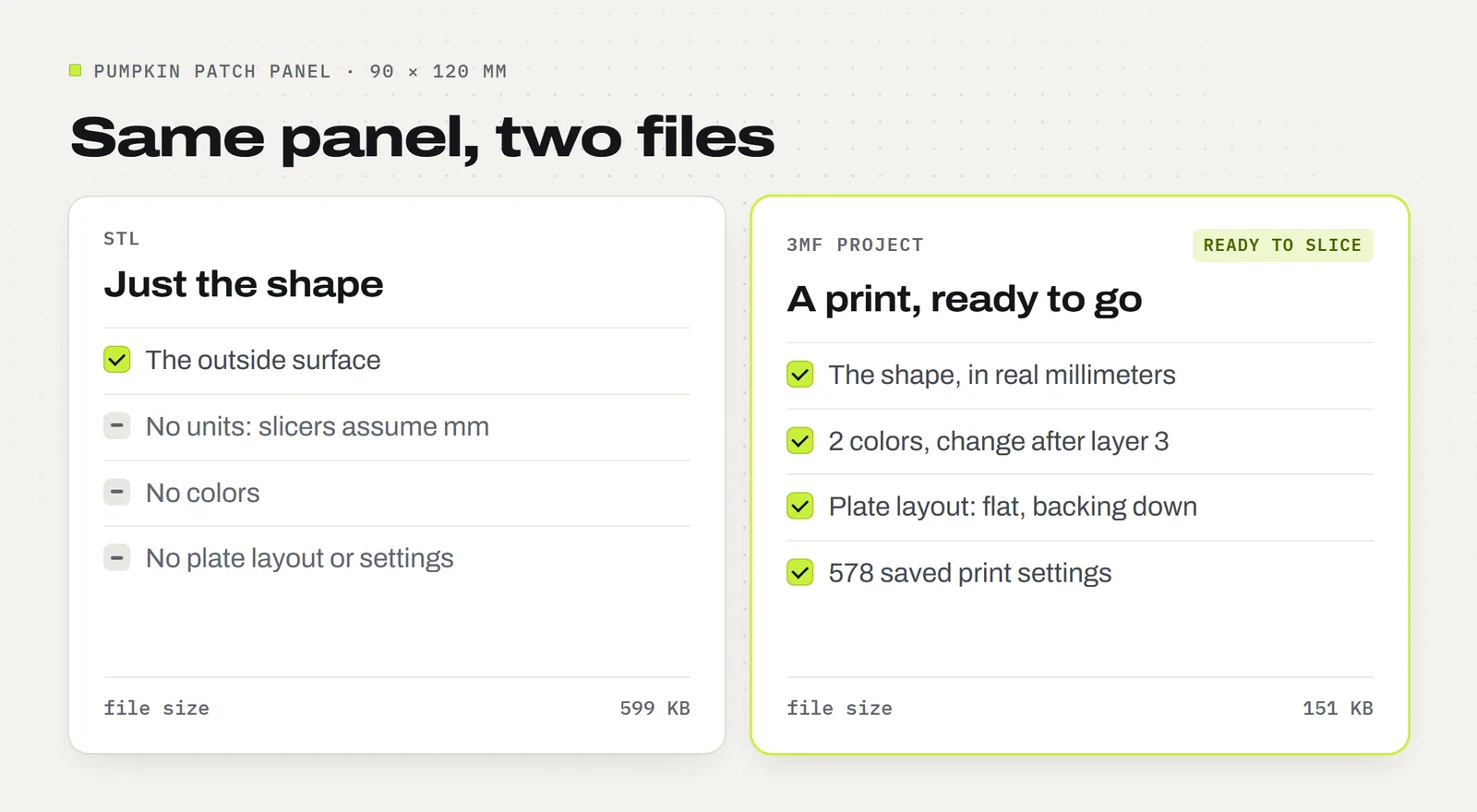
That's all it holds, though: the shape. An STL has no colors, no units (slicers assume millimeters), no plate layout and no print settings. A design with several parts or colors comes as several STL files that you line up and set up yourself. The snowman from our Christmas Ornament Set, for example, is five STL files: the whole shape, plus one piece for each of its four colors.
What is a 3MF file?
3MF stands for 3D Manufacturing Format. It was launched in 2015 by the 3MF Consortium, founded by Microsoft, Autodesk, HP and other companies, to replace STL. A 3MF is really a small package, a bit like a ZIP file, that can hold:
- the shape of every part, with real units
- which color or material each part uses
- how the parts are laid out on the build plate, even across several plates
- the print settings, saved by the slicer that made it
- a preview picture
So a 3MF made in Bambu Studio opens with the plate set, the colors assigned and the settings saved. That's the difference between "here's a shape" and "here's a print, ready to go". Bambu Studio, OrcaSlicer, PrusaSlicer and Cura all open 3MF files, though each slicer only keeps its own settings. Our guide to 3MF files covers how to open one and what's inside.
3MF vs STL, side by side
| STL | 3MF | |
|---|---|---|
| The shape | Yes | Yes, with the same detail |
| Units | No, slicers assume millimeters | Yes |
| Colors | No | Yes |
| Several parts in one file | No, one file per part | Yes |
| Plate layout | No | Yes, even several plates |
| Print settings | No | Yes, for the slicer that saved them |
| File size | Larger | Usually about a quarter of the STL |
| Opens in | Every slicer and most 3D programs | Most modern slicers |
| Best for | Opening anywhere, changing the shape | Printing, especially on Bambu Lab printers |
Why is the 3MF smaller when it holds more?
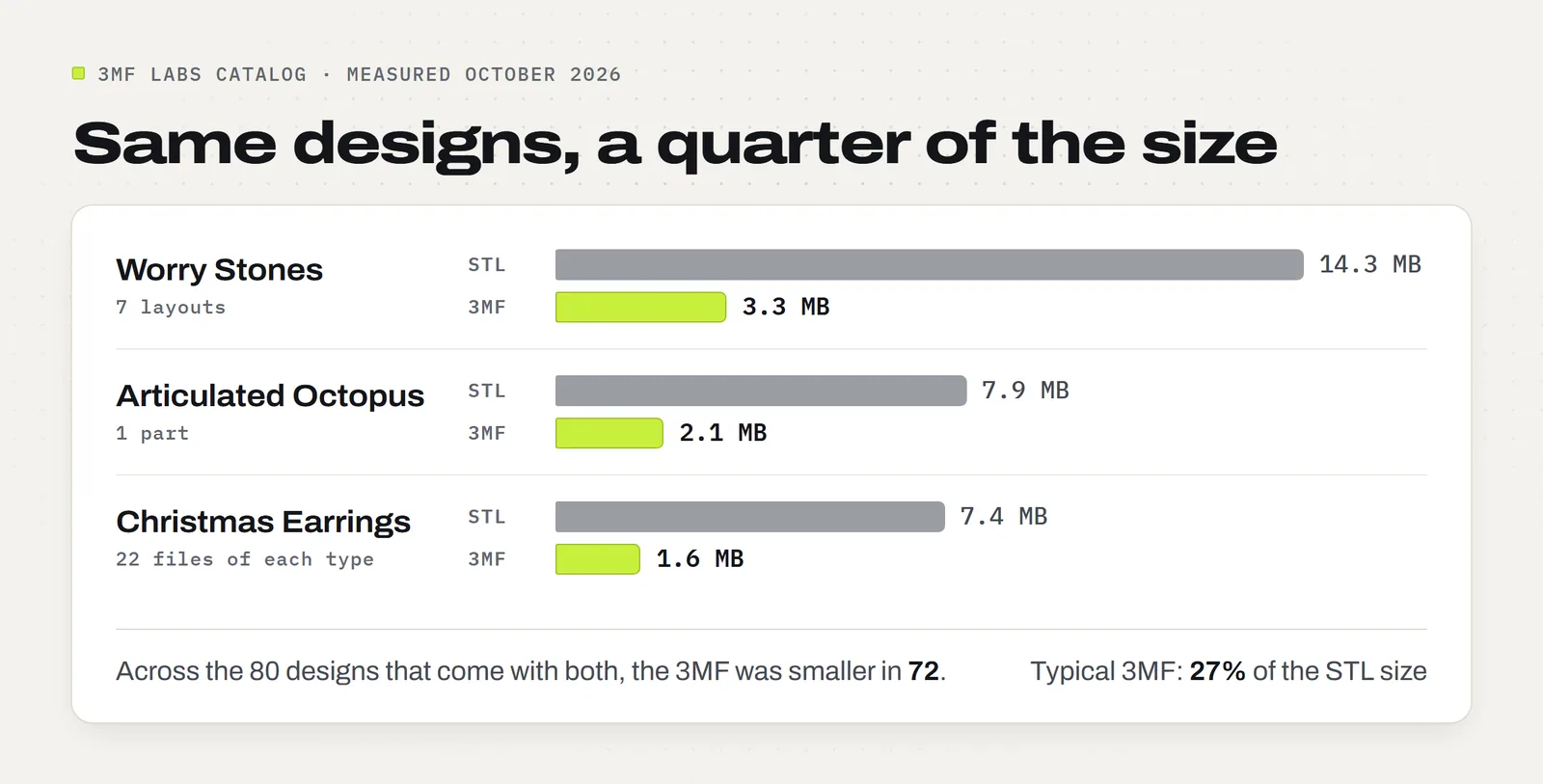
Two reasons. A 3MF is compressed, like a ZIP file. And it stores each corner of the triangle mesh once, where an STL writes the same corner again for every triangle that touches it.
We measured every design in our catalog that comes with both files. In 72 of the 80, the 3MF was smaller, and the typical 3MF was 27% of the size of the STL files for the same design. Most of the few that came out bigger have a sliced copy of the print saved inside the project.
Is 3MF better than STL?
For printing, usually yes. The file type doesn't change how smooth or detailed a print comes out: that's set when the designer exports the shape, and the same shape prints the same from either file. What a 3MF adds is the setup. The colors, the layout and the settings come with it, so there's less to redo and less to guess.
STL still has two things going for it. It opens in anything, including older programs and many design tools. And it's a clean start when you'd rather use your own settings.
Pick the 3MF when
- Your slicer opens it (most do)
- The design has several colors or parts
- You want the settings the designer tested
- You print the same thing again and again
Pick the STL when
- A program only takes STL
- You'll change the shape in a design program
- You'd rather start from your own settings
- Your printer's software is old
Which one should you use?
- You print on a Bambu Lab printer: open the 3MF project in Bambu Studio. Check that the filament colors match what's loaded, then print.
- You use another printer: open the 3MF in your slicer and choose your own printer profile, or start from the STL with the settings you always use.
- You sell your prints: start from the 3MF project when you can. The same saved settings give the same result every time, which matters when you're printing stock.
Our downloads include a 3MF project where it fits, next to the STL, plus a guide with the settings written out. Each model page lists exactly which files you get.
Does Bambu Lab prefer STL or 3MF?
Bambu Studio opens both, but 3MF is its own project format: when you save in Bambu Studio, you're saving a 3MF. A 3MF made for a Bambu printer brings its plates, colors and settings with it, which is why MakerWorld, Bambu Lab's model site, shares its print profiles as 3MF files. An STL works too; you just set it up yourself. New to it? Our Bambu Studio guide walks through a first print.
What about STEP, OBJ and G-code?
These come up next to STL and 3MF, but they do different jobs.
- STEP is a design file, not a print file. Design programs such as Fusion and Onshape save exact curves in it, so it's the file you edit. Bambu Studio and PrusaSlicer can import a STEP and turn it into triangles, but designers usually share STL or 3MF for printing.
- OBJ is a mesh format from 3D graphics and animation. Like an STL, it holds the shape, and it can carry colors and textures in a separate file. Slicers open it, but it brings no print settings.
- G-code is what the printer actually runs: a list of moves, layer by layer, written by the slicer for one printer. You get G-code by slicing a 3MF or STL. A file ending in
.gcode.3mfis a 3MF that's already sliced for one printer model.
How to convert 3MF to STL, and back
3MF to STL: open the 3MF in Bambu Studio or OrcaSlicer and choose File, Export, Export all objects as one STL. In PrusaSlicer it's File, Export, Export Plate as STL/OBJ. The colors, layout and settings stay behind, because STL can't hold them.
STL to 3MF: open the STL in your slicer, set it up the way you like (printer, filament, colors, settings), then choose File, Save Project As. It's saved as a 3MF that reopens exactly as you left it.
There's no need for an online converter: it uploads your file to someone else's server to do what a free slicer does in a minute. Our conversion guide has every step, and the fix for files that come out the wrong size.
Converting files for your own printing is fine under our license. Sharing or selling the converted files isn't.
Common questions
Can a 3D printer print a 3MF file directly?
Not a plain 3MF project. Printers run G-code, so you open the 3MF in a slicer, slice it and send the result. A .gcode.3mf file has already been sliced and prints straight away, but only on the printer model it was sliced for.
Does converting 3MF to STL lose quality?
No, the shape comes through unchanged. What you lose is everything else: the colors, the plate layout, the print settings and the units. You set those again in your slicer.
Can Cura open 3MF files?
Yes. Cura opens 3MF files and loads the shapes. It doesn't use settings saved by another slicer such as Bambu Studio, so choose your printer profile and settings in Cura before slicing.
Can I open a 3MF file without a slicer?
To look at one, yes. The free browser viewer at 3dviewer.net opens 3MF and STL files without installing anything. To print, you still need a slicer.
Is 3MF an open format?
Yes. The 3MF Consortium publishes the specification for free, and any program can use it. That's why most slicers and many design programs now open and save it.
Why do some downloads include both files?
So the design works whatever you print on. The 3MF gives you a ready setup in slicers that read it, and the STL opens anywhere. Every 3MF Labs model page lists exactly which files you get.
Designs from this guide
 $3.79
3ML-021 · Ornament set
Christmas Ornament Set
Six flat layered tree ornaments with bold black outlines: a snowflake, a snowman, a candy cane, a gingerbread man, a Christmas tree and a blank name banner you personalize. STL + 3MF · 8.7 MB View model $3.79
3ML-028 · Earring collection
Christmas Earrings
Four pairs of Christmas earrings: gingerbread men, candy canes, snowflakes and Christmas trees. STL + 3MF · 4.0 MB View model $3.79
3ML-014 · Lantern panels
Harvest Lantern Panels
Four light-up Thanksgiving scenes for our Modular Lantern: a pumpkin patch under the harvest moon, a turkey, falling leaves and acorns. STL + 3MF · 3.7 MB View model $2.49
3ML-052 · Worry stone
Worry Stones
Six pocket worry stones with a smooth, deep thumb dip: a classic oval, a rippled oval, a heart, a leaf, a paw and a turtle. STL + 3MF · 8.4 MB View modelSources: the 3MF Consortium, Prusa Knowledge Base: Export, and our own catalog files, measured October 28, 2026.