PLA vs PLA+: What Is the Difference and Which Should You Buy?
PLA+ sits next to plain PLA on every filament shelf, a few dollars dearer, with no explanation of the plus. Here is what it changes in a real print, using the makers' own test numbers, and when it is worth buying.
You go to buy a spool of PLA and the shop offers PLA, PLA+, PLA Pro and PLA Tough, sometimes from the same brand, a few dollars apart. Nothing on the box says what the plus stands for. So which one goes in the cart?
This guide explains what PLA+ is, what the plus changes in a real print, and when it is worth paying for. We use the makers' own published numbers, and we checked which plastic the 612 project files behind our ready-to-print designs are saved for. The short version: for most things you print, plain PLA is the right spool.
What is PLA+?
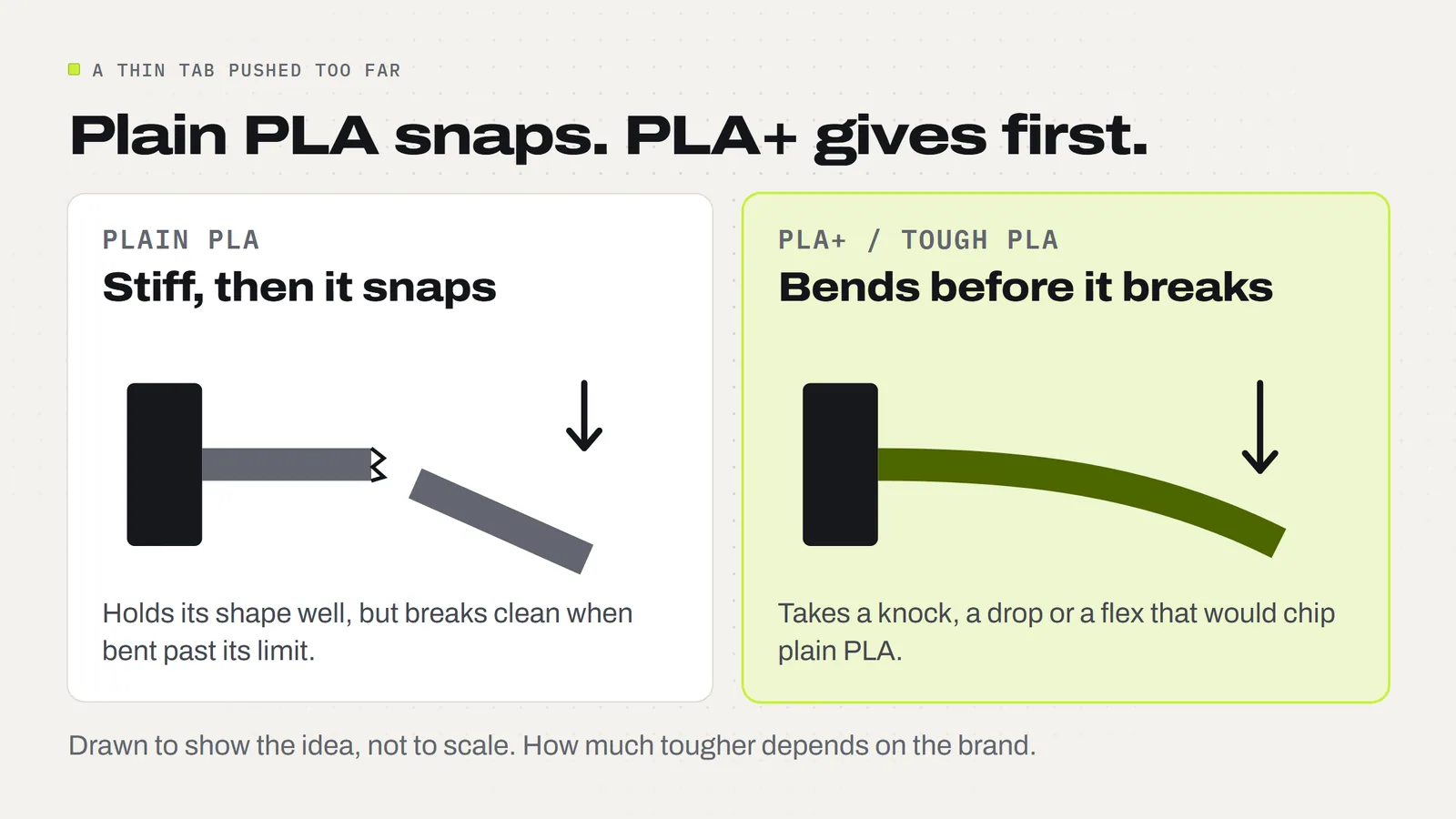
PLA (polylactic acid) is the standard beginner filament: a plant-based plastic that melts at a low heat and prints without fuss. PLA+ is PLA with other ingredients blended in to change how it behaves, mainly to make it less brittle. A plain PLA part that is bent too far snaps. A PLA+ part is meant to give a little first.
Here is the part most guides skip: PLA+ is a marketing name, not a standard. No rule says what has to be in the spool. Each maker has its own recipe and keeps it to itself. eSUN, one of the best-known PLA+ brands, describes its version only as a "modified PLA formula" that is stronger and tougher than standard PLA. Xometry's materials guide describes PLA+ in general as PLA with added modifiers that improve toughness. Nobody publishes the recipe.
That is why "PLA+", "PLA Plus", "PLA Pro" and "Tough PLA" all sit on the same shelf. They are the same idea under different names, and one brand's plus is not the same plastic as another's. The only way to know what a given spool does is to read that maker's data sheet, the one-page list of test results most brands post on the product page.
What is the actual difference between PLA and PLA+?
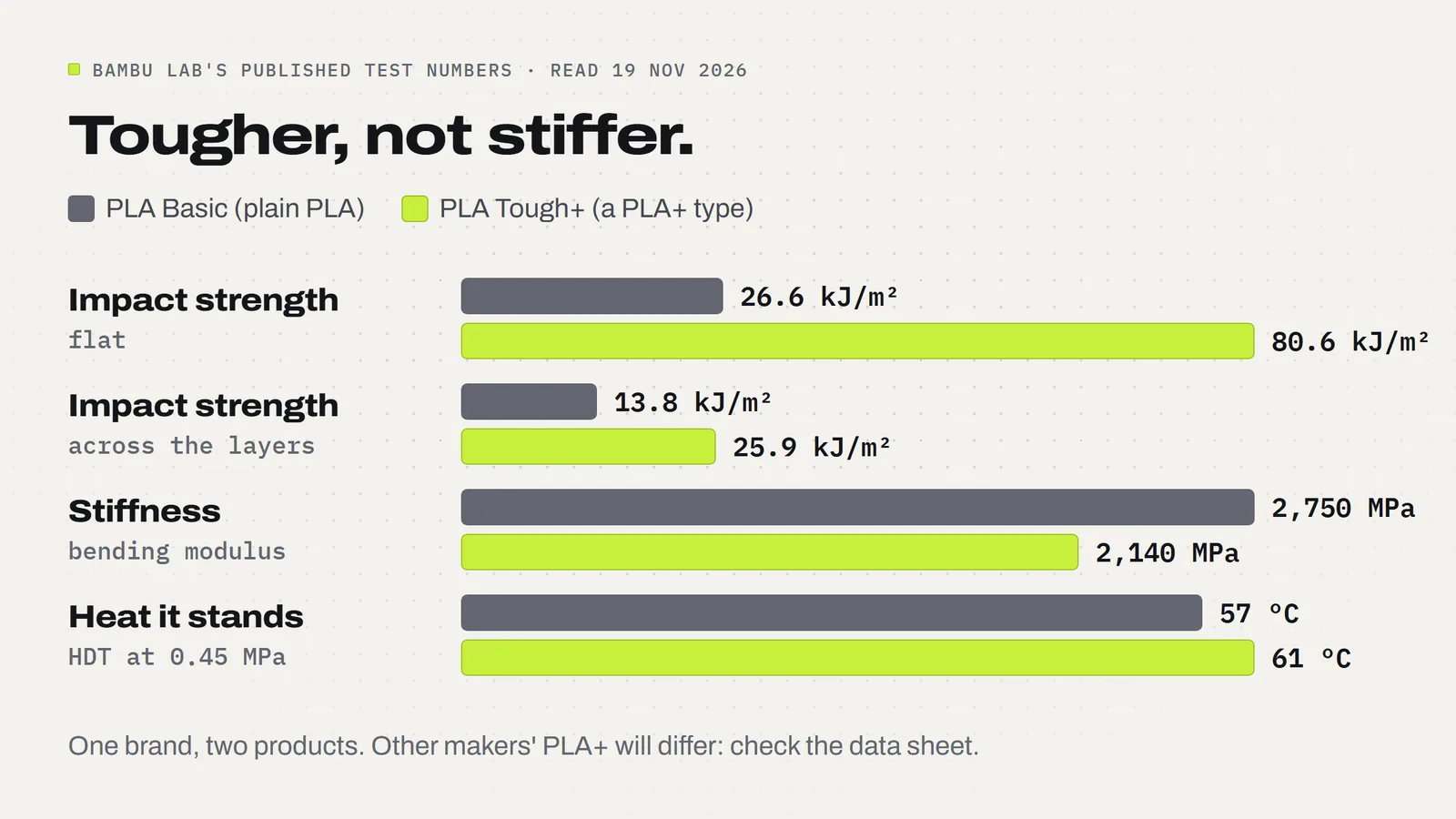
Because recipes vary, the fairest comparison is one maker testing its own two spools the same way. Bambu Lab does this on the product page for its toughened PLA, called PLA Tough+, with its everyday PLA Basic alongside. The numbers below are Bambu's.
| What was measured | PLA Basic (plain PLA) | PLA Tough+ (a PLA+ type) | What it means |
|---|---|---|---|
| Impact strength, flat | 26.6 kJ/m² | 80.6 kJ/m² | About three times harder to break with a knock or a drop |
| Impact strength, across the layers | 13.8 kJ/m² | 25.9 kJ/m² | Layers hold together almost twice as well |
| Bending strength | 76 MPa | 65 MPa | Plain PLA takes more force before it bends |
| Stiffness (bending modulus) | 2,750 MPa | 2,140 MPa | Plain PLA is the stiffer of the two |
| Heat it stands (HDT at 0.45 MPa) | 57 °C | 61 °C | Nearly the same: both soften in a hot car |
| Nozzle temperature range | 190 to 230 °C | 220 to 250 °C | The tough one prints hotter |
Read the table top to bottom and the picture is clear. The plus buys toughness: how much of a knock, drop or flex a part survives. It does not buy stiffness. Plain PLA is the more rigid plastic, and on Bambu's numbers it also takes more bending force before it gives.
That matters because "tougher" and "stronger" get used as if they meant the same thing. They don't. A stiff shelf bracket and a clip that has to flex open a hundred times ask for opposite things. PLA+ helps the clip. It does nothing for the bracket.
One caution: these are one brand's numbers for one product. Another maker's PLA+ may be a smaller step up from its plain PLA, or a different trade altogether. Use the table to understand the kind of change, then check the data sheet for the spool you are actually buying.
Is PLA+ stronger than PLA?
It is tougher, which is what most people mean when they ask. Drop a PLA+ part on a hard floor and it is more likely to bounce than chip. Flex a thin PLA+ tab and it is more likely to spring back than snap. On Bambu's numbers that is roughly a threefold gain in impact strength.
It is not stronger in the sense of holding more weight without bending. If anything the plain spool wins there. And it is not a fix for heat. The two soften within about 4 °C of each other, so a PLA+ print left in a closed car in summer sags just like a PLA one. For heat or outdoor use the answer is a different plastic, which we cover in PLA vs PETG for things you'll sell.
Does PLA+ print at a different temperature?
Usually a little hotter. The spool label is the rule, and these are the published ranges for three common spools:
- Bambu PLA Basic (plain PLA): nozzle 190 to 230 °C.
- eSUN PLA+: nozzle 210 to 230 °C, bed 45 to 60 °C.
- Bambu PLA Tough+: nozzle 220 to 250 °C, bed 35 to 65 °C.
Notice that the ranges overlap. A printer set to 220 °C sits inside all three. That is the temperature saved in every one of our PLA project files, so a mild PLA+ like eSUN's will usually print from a plain PLA profile without changes. A hotter blend like Tough+ wants its own profile. On a Bambu Lab printer with an AMS (the box that feeds the spools), Bambu's own spools carry a tag the printer reads, so the settings are picked for you.
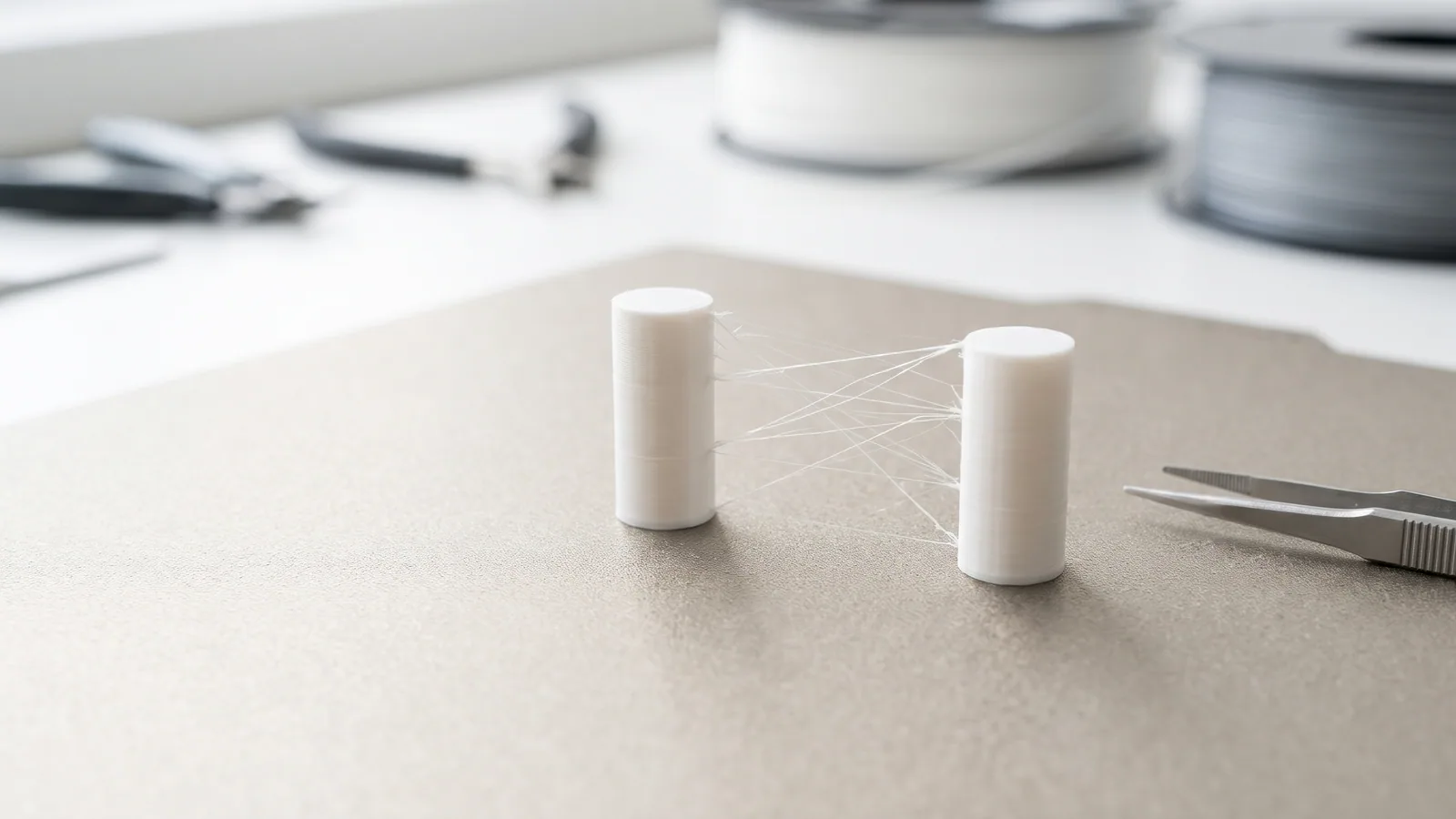
If your slicer has no profile for your PLA+ brand, start from the plain PLA profile and set the nozzle to the middle of the range on the spool. If layers split when you flex a test print, go up 5 °C. If you get strings and blobs, come down 5 °C. Our PLA temperature guide shows what too hot and too cold look like.
Bambu also notes that Tough+ has a slightly stronger smell than regular PLA when it melts, because of the higher printing temperature. It suggests lowering the temperature or keeping the room aired if that bothers you.
One thing the plus does not change is moisture. Both of Bambu's data sheets give the same advice for the plain and the tough spool: store it sealed with desiccant below 20% humidity, and dry it at 55 °C for 8 hours if it has taken on water. eSUN gives 50 °C for 8 to 12 hours for its PLA+. A damp spool of either kind prints with strings and a rough surface (how to fix stringing).
Which one do our project files use?
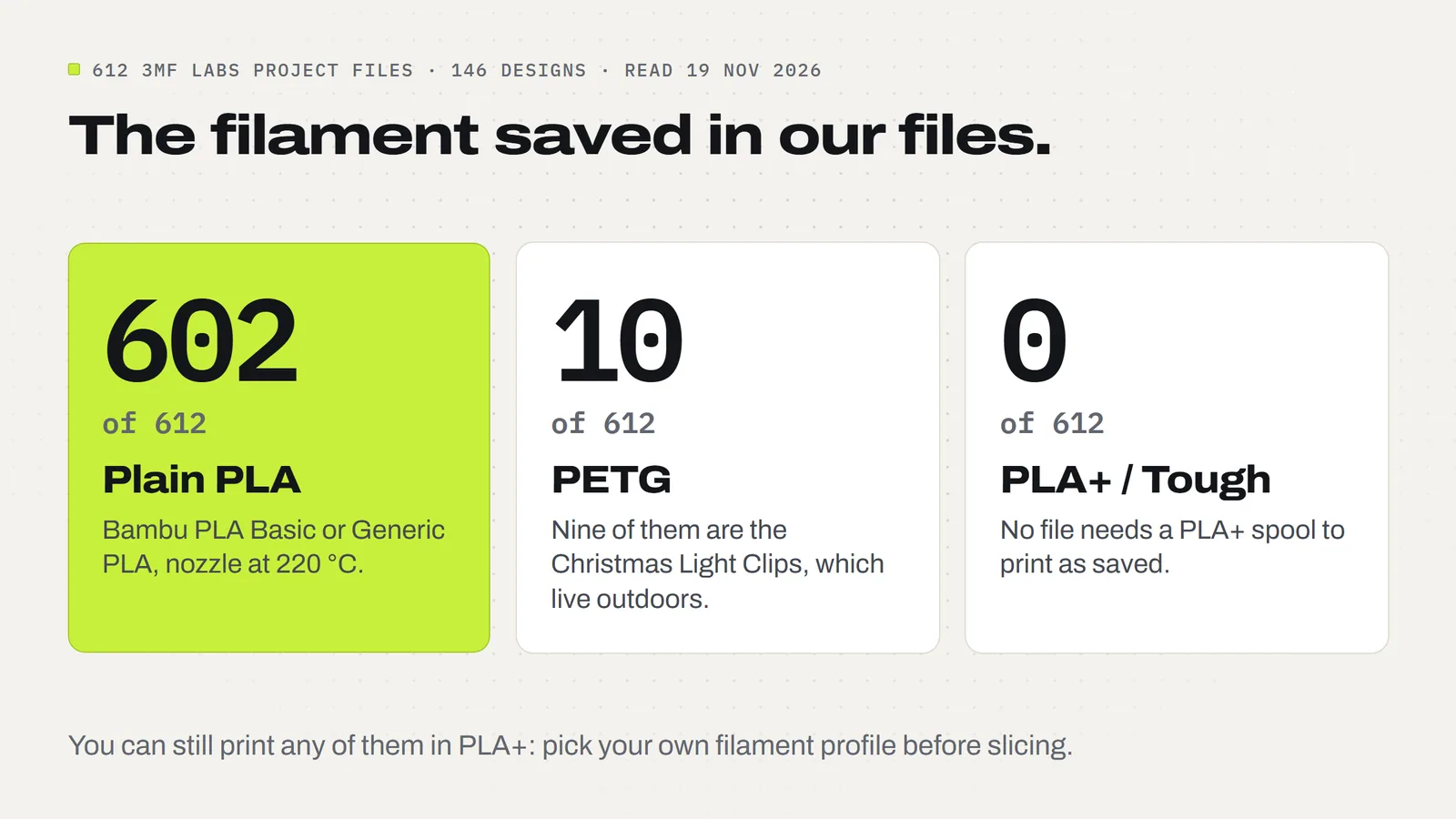
Every design we sell comes as a 3MF project, a file that carries the plate layout, colors and print settings along with the shape (what a 3MF file is). The filament each one was set up for is saved inside. On 19 November 2026 we read all of them: 612 project files across 146 designs.
- 602 are saved for plain PLA. They use either Bambu's PLA Basic profile or the slicer's Generic PLA profile, with the nozzle at 220 °C in every one.
- 10 are saved for PETG. Nine of those are the Christmas Light Clips, which live outdoors on a gutter.
- None are saved for a PLA+, Pro or Tough profile.
That is not a verdict against PLA+. It tells you what the designs were set up and tested with, and what you need on the shelf to print them as saved: ordinary PLA. Lantern plates, ornaments, earrings, bowls and shelf decor sit still for a living. They never need to survive a knock, so the plus has nothing to do.
You can still load PLA+ and print any of these. The shapes don't care. Pick your PLA+ profile in the slicer before you slice, so the temperature matches your spool rather than ours.
When is PLA+ worth paying for?
When a part has to take abuse. Ask one question about the thing you are printing: will it be dropped, flexed, snapped together or carried around? If yes, the plus earns its price. If it sits on a shelf, it doesn't.
Good jobs for PLA+:
- Clips and snap-fit parts. Hinges and latches that work every time the part is used, like the snap latch on our Bag Clips.
- Toys that get played with. Wheels, axles and anything a child will throw. A snap-together kit like the Monster Truck prints fine in plain PLA as saved, and a tougher spool gives the snap joints more margin.
- Fidgets and pocket items. Things that live in a pocket or a bag and hit the floor weekly.
- Thin hooks and hangers. Parts where a snapped tip means a broken product.
- Anything you ship. A print that rattles around in a parcel is less likely to arrive with a corner chipped.
Jobs where plain PLA is the better pick:
- Decor, lanterns, ornaments and signs. Nothing knocks them. Plain PLA is also usually where the color choice is: Bambu's Tough+ came in 10 colors when we looked.
- Stiff parts. Brackets, stands and frames that should not flex.
- Multicolor prints. Keep every color the same kind of plastic. Mixing a plain PLA and a hotter PLA+ on one print means the printer has to change temperature between colors.
- Anything where cost per piece matters. More on that next.
How much more does PLA+ cost?
Usually a few dollars a kilo, and prices move with every sale. As a snapshot from the makers' own US stores on 19 November 2026: Bambu listed PLA Tough+ at a list price of $20.99 for a 1 kg spool, with PLA Basic shown on the same page at a typical price of $17.99. eSUN listed its PLA+ at a regular price of $22.99, on sale from $16.99.
At Bambu's list prices that is $3 a kilo, or 0.3 cents a gram. Our small Bag Clip uses 9 g of plastic, so the tough spool adds under 3 cents. The Monster Truck uses 407 g, so it adds about $1.22. For a clip or a toy that is cheap insurance. For a table of lantern plates at a craft fair it is money spent on a benefit nobody will ever see. If you sell what you print, work it into your numbers the same way as any other material (what a print really costs).
So which should you buy?
If you are new, or you mostly print decor and gifts, buy plain PLA from a brand with a profile in your slicer. It is the cheapest, the easiest to print and the one nearly every ready-made project file expects, ours included.
Buy one spool of PLA+ in black or white when you start printing things that work for a living: clips, hinges, toy parts, tool holders. Keep it for those jobs. You don't need it in every color.
Whichever you pick, three habits matter more than the plus sign:
- Read the spool label and print inside its temperature range.
- Keep it dry. A sealed box with desiccant beats any upgrade.
- Stay with one brand per print. Colors from the same line behave the same way.
If you sell your prints, our license lets you sell the physical prints you make from any of our designs, in whatever plastic you choose. More on that in our guide to selling 3D prints, and answers to common questions are in the FAQ.
Designs from this guide
 $2.49
3ML-083 · Bag clips
Bag Clips
Snack bag clips in three sizes that print in one go with the hinge already inside: fold them shut once and they snap closed. STL + 3MF · 1.2 MB View model $5.99
3ML-134 · Snap-together toy truck
Monster Truck
A big snap-together monster truck with a square pickup body, a roll cage and race seat inside, and four huge tyres that turn. 20 pieces, no glue, no screws, no AMS. STL + 3MF · 9.1 MB View model $2.49
3ML-045 · Light clips
Christmas Light Clips
Four one-piece clips for hanging outdoor string lights on gutters, shingles and round porch rails, with no nails, screws or tools. STL + 3MF · 6.2 MB View model $2.49
3ML-127 · Fidget spinner
Heart Fidget Spinner
Five red hearts that spin around a centre hub, with a little white heart on each. It prints in place in one piece: no metal bearing, no assembly. STL + 3MF · 4.3 MB View model $2.49
3ML-012 · Lantern frame
Modular Lantern Frame
The Modular Lantern's frame, roof and carry handle. Print it once, then slide in a set of panels for every season. STL + 3MF · 2.0 MB View modelQuestions
What is the difference between PLA and PLA+?
PLA+ is PLA blended with additives that make it less brittle. On Bambu Lab's published numbers, its toughened PLA has about three times the impact strength of its plain PLA, but is less stiff and stands almost the same heat. The exact difference depends on the brand, because PLA+ is not a standard.
Is PLA+ stronger than PLA?
It is tougher: it survives knocks, drops and flexing better. It is not stiffer. Bambu Lab lists a bending strength of 76 MPa for PLA Basic against 65 MPa for PLA Tough+, so plain PLA resists bending slightly better. Choose PLA+ for parts that flex or get dropped, not for rigid parts.
Is PLA+ worth it?
For clips, snap-fit parts, toys and anything that gets dropped or shipped, yes. For decor, ornaments, lanterns and signs, no: nothing knocks them, so plain PLA does the same job for less. All 602 of our PLA project files are saved for plain PLA.
What temperature does PLA+ print at?
Follow the spool label. eSUN gives 210 to 230 °C for its PLA+, and Bambu Lab gives 220 to 250 °C for PLA Tough+, against 190 to 230 °C for its plain PLA Basic. 220 °C sits inside all three ranges.
Can I use PLA settings for PLA+?
Often, yes. A mild PLA+ whose range includes 220 °C usually prints from a plain PLA profile. A hotter blend such as Bambu PLA Tough+ (220 to 250 °C) should use its own profile. If layers split when you flex a test print, raise the nozzle 5 °C.
Is PLA+ more heat resistant than PLA?
Barely. Bambu Lab lists a heat deflection temperature of 61 °C for PLA Tough+ and 57 °C for PLA Basic. Both soften in a hot car or on a sunny windowsill. For heat or outdoor use, pick PETG instead.
Is PLA Pro the same as PLA+?
They are the same idea: PLA with additives for toughness. PLA+, PLA Plus, PLA Pro and Tough PLA are brand names, not standards, so two spools with the same name from different makers can behave differently. Compare the makers' data sheets.
Does PLA+ need to be dried?
Yes, like plain PLA. Bambu Lab gives the same advice for both of its spools: store sealed with desiccant below 20% humidity and dry at 55 °C for 8 hours. eSUN gives 50 °C for 8 to 12 hours for its PLA+.
Sources
- Bambu Lab US Store: PLA Tough+ (comparison table with PLA Basic, list price, printing tips)
- Bambu Lab: PLA Basic Technical Data Sheet (nozzle 190-230 °C, drying 55 °C for 8 hours)
- Bambu Lab: PLA Tough+ Technical Data Sheet V3.0 (nozzle 220-250 °C, bed 35-65 °C)
- eSUN: PLA+ filament (nozzle 210-230 °C, bed 45-60 °C, drying 50 °C for 8-12 hours, price)
- Xometry: PLA vs. PLA+ (PLA+ described as PLA with modifiers for toughness)
Filed under Printing and slicing