3D Printed Earrings: How to Print Them, Add the Hooks and What to Charge
Earrings print flat, fast and cheap. The parts people get wrong are the colors, the metal hooks and the price. Here is all three, worked through on four real Christmas pairs.
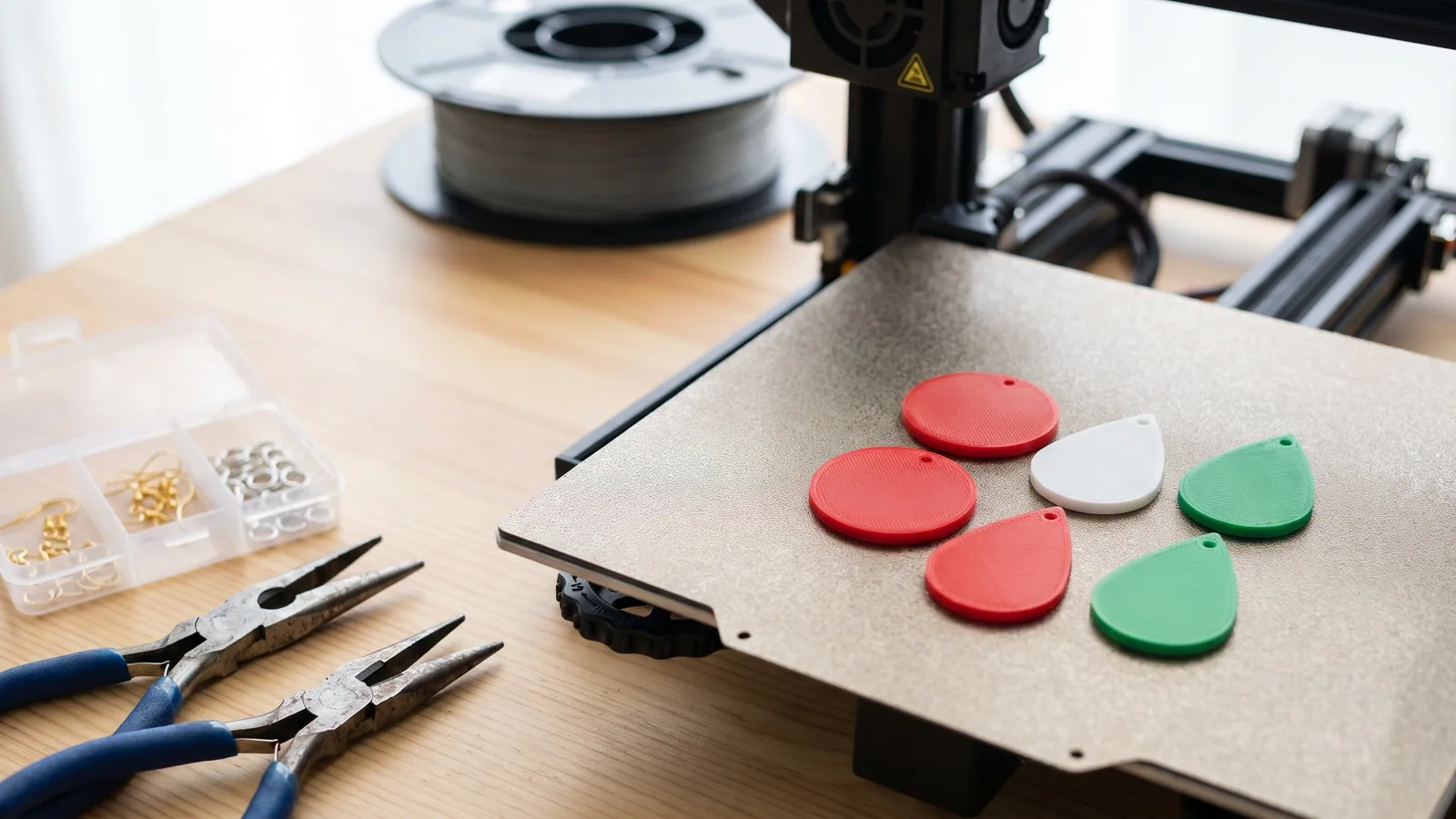
Earrings might be the easiest thing to 3D print and sell. They're tiny, they print flat with no supports, a whole plate of them takes less time than one ornament, and nobody needs a fancy printer to make them. The hard parts are the bits people don't expect: getting two or three colors into something 2.4 mm thick, picking ear wires that won't make anyone itch, and charging enough once the metal parts and your time are counted.
This guide walks through all of it using our Christmas Earrings as the worked example: four pairs (gingerbread men, candy canes, snowflakes and Christmas trees), eight charms in all. Every size, layer number and filament weight below comes from that design's own download. Where we use a price we don't control, like a spool of filament or a pack of ear wires, we say so and you should swap in your own.
New to the files themselves? What a 3MF file is takes a few minutes and explains why most of the setup is already done for you.
Can you 3D print earrings?
Yes, and they're one of the better first projects. A 3D printed earring is a flat plastic charm with a small hole at the top. You print the charm, then hang it from a metal ear wire with a small metal ring called a jump ring. The plastic never goes through your ear; the metal hook does.
Three things make earrings a good fit for a home printer:
- They're flat. A charm lies face up on the plate, so there's nothing to hold up with supports and nothing to snap off afterwards.
- They're small. Our Christmas charms are about 26 to 30 mm tall, roughly the height of a thumb from the tip to the first knuckle. Eight of them fit on one plate with lots of room to spare.
- They're light. Ours are 2.4 mm thick at the thickest point. Heavy earrings pull on the ear; a printed charm weighs about as much as a paper clip or less.
What a printer can't make well is the ear wire itself. A plastic hook bends, wears and is not something you want sitting in a piercing all day. Every earring design we sell expects you to add metal hooks, and so should any design you buy.
How long does it take to 3D print earrings?
Minutes, not hours. The slicer estimates in the Christmas Earrings download (single color, without pauses for color changes) are:
| Pair | Size (mm) | Filament | Print time | Colors | Without an AMS |
|---|---|---|---|---|---|
| Gingerbread men | 18.8 × 28.4 | 0.93 g | 6 min 44 s | Caramel, white, red | Yes, 2 pauses |
| Candy canes | 13.1 × 30.4 | 0.73 g | 5 min 57 s | White, red, dark green | Yes, 2 pauses |
| Snowflakes | 22.4 × 26.6 | 2.00 g | 11 min 52 s | Red, white | Yes, 1 pause |
| Christmas trees | 18.1 × 28.7 | 1.05 g | 7 min 23 s | Green, yellow, red, caramel | Use the By-Layer version |
| All four pairs on one plate | 124.3 × 68.7 (plate area) | 4.72 g | 31 min 35 s | 4-color AMS | One color only |
Sizes are one charm, width × height, including the hanging loop. Times are slicer estimates for the shape alone. Real color prints take longer: each manual filament swap adds a few minutes of your time, and an AMS adds time for every color change while it purges the old color out of the nozzle.
That last point is worth seeing in real numbers. Our Halloween Earrings include two bat pairs whose black and purple run through every layer, so they need an AMS. Printed in full color, all four Halloween pairs are listed on the model page at 2 h 20 min and 25 g of filament. The Christmas set's eight charms, printed in one color, are 4.72 g and about 32 minutes. Different designs, so not a perfect comparison, but the lesson holds: color changes, not the charms themselves, are where the time and the plastic go.
How do you 3D print earrings in more than one color without an AMS?
Stack the colors in layers and swap the filament by hand. An AMS (Bambu Lab's automatic filament changer) is only needed when two colors share the same layer (how to tell if a design needs one). If each color sits in its own band of layers, one spool does the bottom, you pause, load the next spool, and carry on.
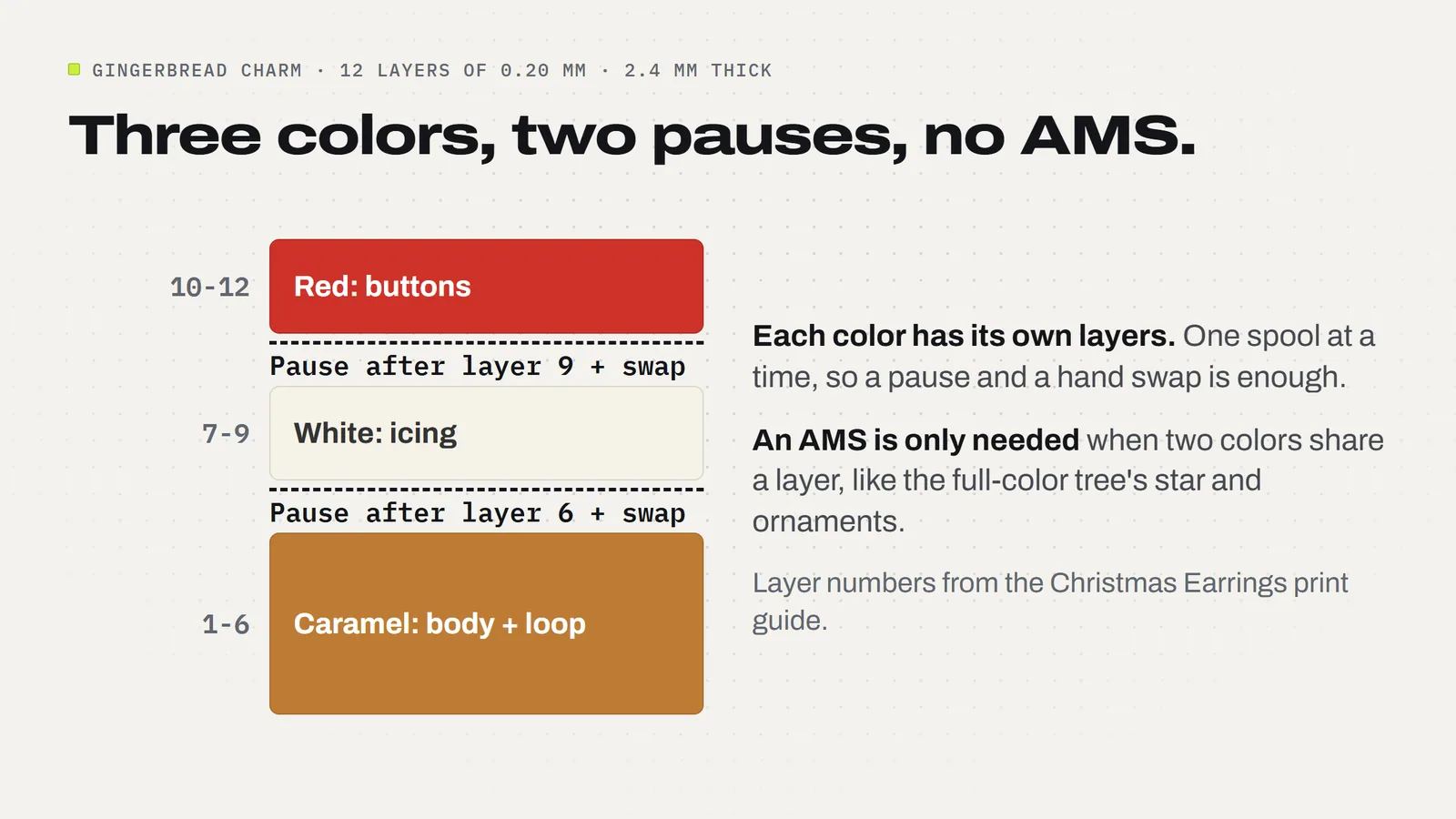
Our charms are built exactly that way. Every layer is 0.20 mm, so 12 layers make the full 2.4 mm. The gingerbread man, for example:
- Layers 1 to 6, caramel: the body and the hanging loop (0 to 1.2 mm).
- Layers 7 to 9, white: the icing, plus the little white pads under the buttons (1.2 to 1.8 mm).
- Layers 10 to 12, red: the three buttons on top (1.8 to 2.4 mm).
So you add two pauses: after layer 6 and after layer 9. In Bambu Studio you slice, move the layer slider in the preview to where the new color starts, right-click it and add a pause; other slicers have the same idea under a slightly different name. The download's guide lists the layers for every pair, so you don't have to work them out.
The snowflake is even simpler: red for layers 1 to 9, white for 10 to 12, one pause. The full-color Christmas tree is the exception. Its star, ornaments and trunk all sit in the same top layers, so it needs an AMS. The download includes a "By-Layer" tree that moves those details into bands you can swap by hand (caramel, then green, then yellow), so you can still print it without one.
Two tips for clean swaps. Purge the new color until it comes out clean before you resume, especially when going to white or yellow, which show any leftover red or green. And let the plate cool before you lift the charms, then lift them by the wide part of the body, never by the thin neck under the loop.
If you're still deciding whether an AMS is worth it, the honest answer for earrings is that it isn't required. Most layered designs are made to work with pauses, and a plate of four pairs with two swaps is a pleasant evening's work.
What settings should I use for 3D printed earrings?
If you open the 3MF project in Bambu Studio, the settings are already saved, so you only need to pick your printer and map the colors. If you're using the STL files in another slicer, these are the settings the charms were made with:
- Layer height 0.20 mm, including the first layer, with adaptive layers off. The color bands depend on every layer being the same height.
- 100% infill. On something this thin it's the difference between a charm that flexes and one that feels solid.
- No supports, no brim, decorative face up and the flat back on the plate.
- Keep the scale at 100%. The hole in each loop is 2 mm. Shrink the charm and the jump ring won't fit; enlarge it and the details stop lining up with the layer bands.
Print slowly on the first layer and check the loops before you walk away. A loop that comes out squashed or half-filled is the most common failure on small charms, and it's easy to spot in the first few minutes.
How do you attach hooks to 3D printed earrings?
With a jump ring. Pass the ring through the charm's loop and the small loop at the bottom of the ear wire, then close it. That's the whole assembly. For each pair you need two ear wires and two jump rings, so the four Christmas pairs need eight of each.
The easiest rings for beginners are hinged "click" jump rings that open and snap shut with your fingers. Our guide suggests ones about 6 mm across with wire up to 0.8 mm thick, which pass through the 2 mm hole with room to swing. Ordinary split jump rings work too: twist them open sideways with two pairs of flat jewelry pliers, never by pulling the ends apart, or they won't close neatly.
Check each finished earring before it goes anywhere. The ring should be fully closed, the charm should swing freely and face forward, and nothing should catch on a fingernail.
What ear wires are best for sensitive ears?
Nickel-free ones. Nickel is a common cause of itchy, red earlobes, and it turns up in cheap jewelry more than you'd think. In a study published in the Journal of the American Academy of Dermatology, researchers bought 277 inexpensive earrings in San Francisco and found nickel in 85 of them, about 31%. The dermatologist behind it advised people to look for jewelry labeled "nickel-free" or "hypoallergenic", and for people who know they react to nickel to wear only stainless steel, platinum or gold.
For you, that means two things. Buy ear wires that are sold as nickel-free from a supplier who says what metal they are, and if you sell your earrings, say on the card or label what the hooks are made of. Buyers with sensitive ears look for that line, and it's an easy one to get right.
The plastic charm itself doesn't touch the piercing, but keep finished earrings away from heat. PLA starts to soften at around 55 to 60 °C, so a hot car dashboard in summer can warp a charm.
What should you charge for 3D printed earrings?
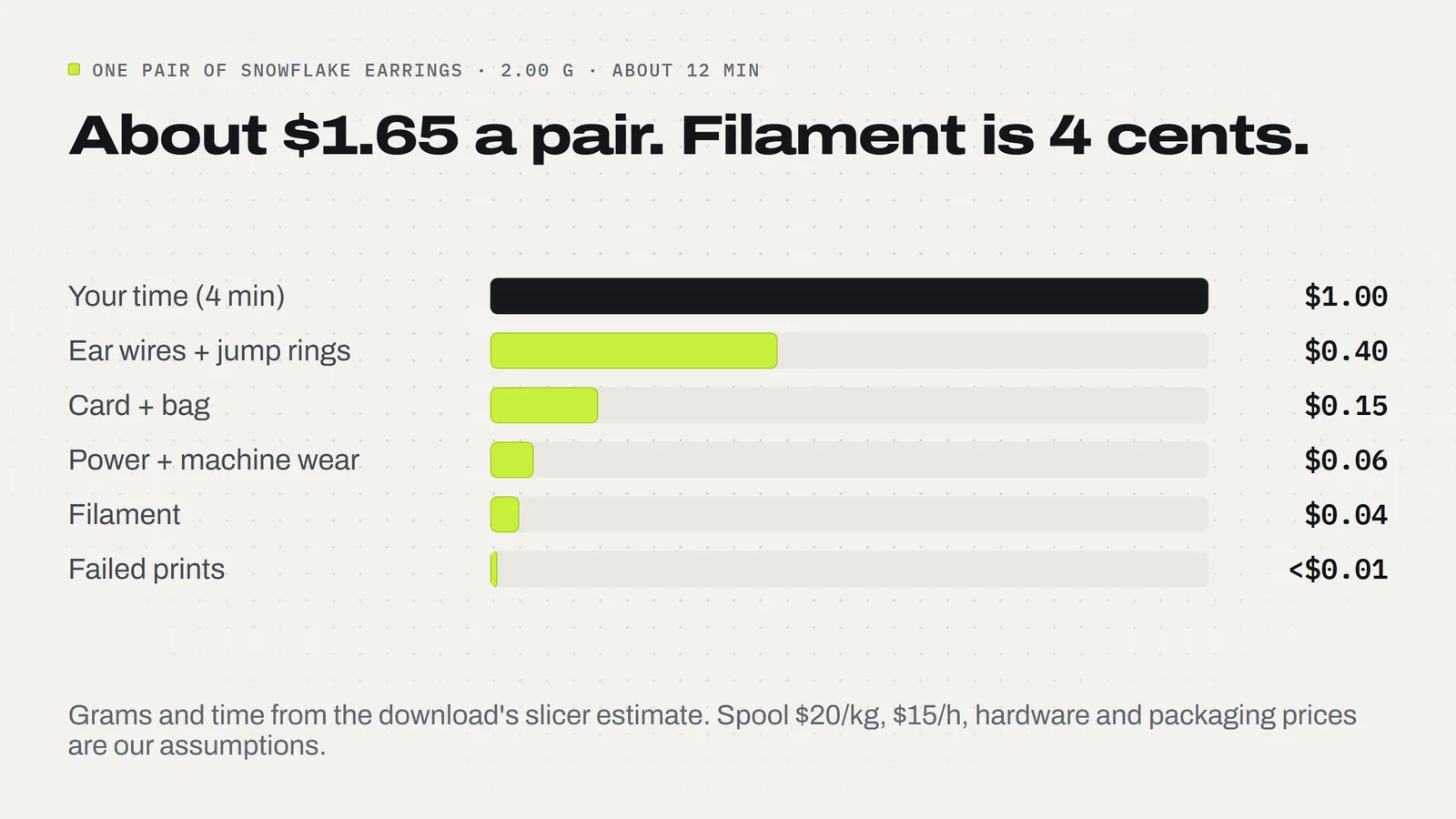
Work out what a pair really costs you first. We used the same six-part formula as our guide on how to price 3D prints, on the snowflake pair (2.00 g, about 12 minutes on the printer):
- Filament: 2 g at $20 a kg spool = 4 cents.
- Electricity and machine wear: about 6 cents for 12 minutes (200 W printer, 18.2 cents a kWh, 25 cents an hour of wear).
- Failed prints: 10% of filament and power, under 1 cent.
- Ear wires and jump rings: 40 cents a pair (our assumption: check your supplier).
- Card and bag: 15 cents (assumption).
- Your time: 4 minutes for the color swap, clearing the plate and fitting the hooks, at $15 an hour = $1.00.
That comes to about $1.65 a pair, and the plastic is the smallest line on the bill. Your time and the metal parts are almost 90% of it. That changes how you should batch: printing all four pairs at once and fitting hooks on twenty pairs in one sitting cuts your minutes per pair far more than any filament saving could.
At twice cost your floor is about $3.30 a pair; at three times, about $5. Those are floors, not a recommendation. Look at what handmade earrings sell for at your fair or in your shop and price from there. Multicolor pairs and anything personalized take longer, so they can sit higher. If you sell at fairs, our list of 3D prints that sell at holiday craft fairs has more small items that pair well with earrings on a table.
Can you sell 3D printed earrings made from a design you bought?
It depends on the design's license, so read it before you print a batch. Ours is short: the 3MF Labs license lets you sell the physical prints you make from our designs with no limit and no royalty. What you can't do is share, upload, resell or give away the files themselves, or remixes of them. Our guide to selling 3D prints covers the rest.
Which earring designs should you print first?
Start with the ones that need the fewest swaps and build up:
- One color: the ghosts and jack-o'-lanterns in the Halloween Earrings print in a single color, so they're the gentlest start.
- One swap: the Christmas snowflakes (red then white).
- Two swaps: the gingerbread men and candy canes, then the By-Layer tree. The Thanksgiving Earrings pie and maple leaf work the same way.
- AMS: the full-color Christmas tree, the full-color turkey and acorn, the Halloween bats, or all four Christmas pairs on one plate.
Christmas earrings sell best from late November into December, so print a test pair of each now, wear them, and see which ones people comment on before you print a batch. Browse every design in the 3MF Labs catalog, or see our Christmas 3D prints guide for what to print alongside them.
Designs from this guide
 $3.79
3ML-028 · Earring collection
Christmas Earrings
Four pairs of Christmas earrings: gingerbread men, candy canes, snowflakes and Christmas trees. STL + 3MF · 4.0 MB View model $3.79
3ML-015 · Earring collection
Thanksgiving Earrings
Four pairs of Thanksgiving earrings: turkeys, pumpkin pie slices, maple leaves and acorns. STL + 3MF · 5.0 MB View model $2.49
3ML-005 · Earring collection
Halloween Earrings
Four pairs of Halloween earrings: ghosts, jack-o'-lanterns and two kinds of bat. STL + 3MF · 4.9 MB View model $3.79
3ML-021 · Ornament set
Christmas Ornament Set
Six flat layered tree ornaments with bold black outlines: a snowflake, a snowman, a candy cane, a gingerbread man, a Christmas tree and a blank name banner you personalize. STL + 3MF · 8.7 MB View modelQuestions
Can you 3D print earrings?
Yes. A 3D printed earring is a flat plastic charm with a small hole at the top, printed face up with no supports. You hang it from a metal ear wire with a jump ring. The plastic never goes through the ear; the metal hook does, so always add metal hooks rather than printing them.
How long does it take to 3D print earrings?
Minutes. The slicer estimates for our Christmas Earrings run from about 6 minutes for a pair of candy canes to about 12 minutes for a pair of snowflakes, and all four pairs on one plate take about 32 minutes in one color. Manual color swaps and AMS color changes add time on top.
Do you need an AMS to print multicolor earrings?
Not for layered designs. If each color sits in its own band of layers, you add a pause in the slicer, swap the spool and carry on. Our gingerbread and candy cane pairs need two pauses and the snowflakes one. You only need an AMS when two colors share the same layer, like our full-color Christmas tree.
What thickness should 3D printed earrings be?
Our charms are 2.4 mm at the thickest point, printed in 12 layers of 0.20 mm with 100% infill. That is thick enough to feel solid and hold raised color details, and light enough to wear all day. The hanging loop has a 2 mm hole, so keep the scale at 100%.
How do you attach hooks to 3D printed earrings?
Pass a jump ring through the charm's loop and the small loop at the bottom of the ear wire, then close it. Hinged click jump rings about 6 mm across with wire up to 0.8 mm close with your fingers. Open ordinary jump rings by twisting them sideways with two pairs of flat pliers.
Are 3D printed earrings safe for sensitive ears?
The printed charm does not touch the piercing; the ear wire does. Use ear wires sold as nickel-free and say on your label what they are made of. In one dermatology study, 85 of 277 inexpensive earrings tested positive for nickel, a common cause of itchy, red earlobes.
How much does it cost to make 3D printed earrings?
About $1.65 a pair in our example. A snowflake pair uses 2 g of PLA, 4 cents at $20 a kg, plus about 6 cents of power and wear, 40 cents of ear wires and jump rings, 15 cents of card and bag, and 4 minutes of your time at $15 an hour. Swap in your own prices.
Can I sell earrings printed from 3MF Labs designs?
Yes. The 3MF Labs license lets you sell the physical earrings you print from our designs with no limit and no royalty. You cannot share, upload, resell or give away the files themselves or remixes of them.
Sources
- American Academy of Dermatology via ScienceDaily: Nearly one-third of inexpensive earrings examined tested positive for nickel (2008)
- JLC3DP: PLA temperature resistance, softening and melting point
- Bambu Lab Wiki: P2S FAQ (power consumption)
- U.S. Energy Information Administration: Short-Term Energy Outlook, electricity (October 2026)
Filed under Printing and slicing